
Chevrolet Spark Owners Manual: Warning Lights, Gauges, and Indicators
Warning lights and gauges can signal that something is wrong before it becomes serious enough to cause an expensive repair or replacement. Paying attention to the warning lights and gauges could prevent injury.
Warning lights come on when there could be a problem with a vehicle function. Some warning lights come on briefly when the engine is started to indicate they are working.
Gauges can indicate when there could be a problem with a vehicle function. Often gauges and warning lights work together to indicate a problem with the vehicle.
When one of the warning lights comes on and stays on while driving, or when one of the gauges shows there may be a problem, check the section that explains what to do. Waiting to do repairs can be costly and even dangerous.
Instrument Cluster
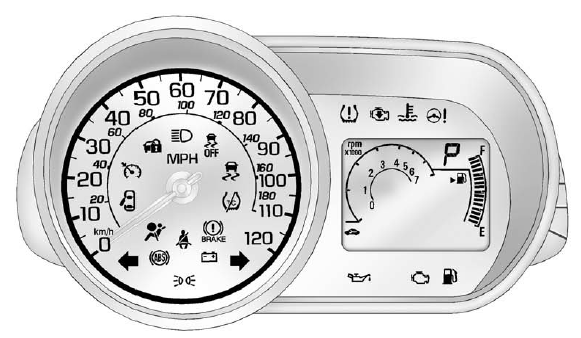
English Automatic Transmission Shown, Metric and Manual Transmission Similar
- Speedometer
- Trip Odometer
- Tachometer
- Fuel Gauge
- Safety Belt Reminders
- Airbag Readiness Light
- Passenger Airbag Status Indicator
- Charging System Light
- Malfunction Indicator Lamp
- Service Vehicle Soon Light
- Brake System Warning Light
- Antilock Brake System (ABS) Warning Light
- Up-Shift Light
- Power Steering Warning Light
- Traction Off Light
- StabiliTrak® OFF Light
- Traction Control System (TCS)/StabiliTrak Light
- Engine Coolant Temperature Warning Light
- Tire Pressure Light
- Engine Oil Pressure Light
- Low Fuel Warning Light
- Immobilizer Light
- Reduced Engine Power Light
- High-Beam On Light
- Front Fog Lamp Light
- Cruise Control Light
 Power Outlets
The accessory power outlets can be used to plug in electrical equipment, such
as a cell phone or MP3 player.
The vehicle has an accessory power outlet in front of the cupholders on the center
sta ...
 Speedometer
The speedometer shows the vehicle speed in kilometers per hour (km/h) and miles
per hour (mph).
Odometer
The odometer shows how far the vehicle
has been driven, in either kilometers or miles. ...
Other materials:
Safety Locks
The vehicle has rear door safety locks on each rear door that prevent passengers
from opening the rear doors from the inside.
Using the Rear Door Safety Lock
Move the lever up to lock.
Close the door.
Repeat Steps 1 and 2 for the other rear door lock.
Caution
Pulling the inside do ...
Information Displays
Driver Information Center (DIC)
The DIC displays information about the vehicle. It also displays warning messages
if a system problem is detected. See Vehicle Messages on page 5-26. All messages
appear in the DIC display in the instrument cluster.
DIC Operation and Displays
The DIC has differ ...
Instrument Panel Illumination Control
This feature controls the brightness of the instrument panel controls and infotainment
display screen. The thumbwheel is to the left of the steering column on the instrument
panel.
(Instrument Panel Brightness):
Move the thumbwheel up or down to brighten or dim the instrument panel contr ...
