
Chevrolet Spark Owners Manual: Engine Compartment Overview
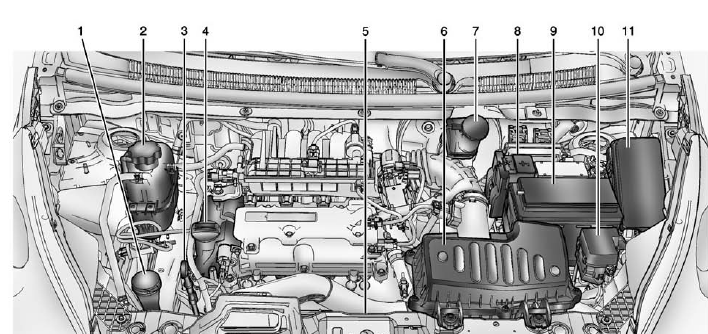
- Windshield Washer Fluid Reservoir. See Washer Fluid on page 10-19.
- Engine Coolant Surge Tank and Pressure Cap. See Cooling System on page 10-13.
- Engine Oil Dipstick. See Engine Oil on page 10-8.
- Engine Oil Fill Cap. See Engine Oil on page 10-8.
- Engine Cooling Fan (Out of View). See Cooling System on page 10-13.
- Engine Air Cleaner/Filter on page 10-12.
- Brake/Clutch Fluid Reservoir.
See Brakes on page 10-19 and Hydraulic Clutch on page 10-12.
- Positive (+) Battery Terminal.
See Battery on page 10-22.
- Battery on page 10-22.
- Auxiliary Fuse Block. See Engine Compartment Fuse Block on page 10-30.
- Engine Compartment Fuse Block on page 10-30.
 Hood
Hood
To open the hood:
Pull the hood release handle inside the vehicle. It is on the lower left
side of the instrument panel.
Go to the front of the vehicle and push the secondary hood ...
 Engine Oil
To ensure proper engine performance and long life, careful attention must be
paid to engine oil.
Following these simple, but important steps will help protect your investment:
Always use engine ...
Other materials:
Engine Air Cleaner/Filter
The engine air cleaner/filter is in the engine compartment on the driver side
of the vehicle. See Engine Compartment Overview on page 10-7 for more information
on location.
When to Inspect the Engine Air Cleaner/Filter
Inspect the air cleaner/filter at the scheduled maintenance intervals.
See ...
Battery
The original equipment battery is maintenance free. Do not remove the cap and
do not add fluid.
Refer to the replacement number shown on the original battery label when a new
battery is needed. See Engine Compartment Overview on page 10-7 for battery location.
Warning
WARNING: Battery posts, ...
Driver Information Center (DIC)
The DIC has different displays, which can be accessed by using the DIC buttons
on the right side of the instrument cluster. The DIC displays trip, fuel, and warning
messages if a system problem is detected.
DIC Buttons
MENU: Press to display the DIC menus.
or
: Use to scroll through th ...
