
Chevrolet Spark Owners Manual: Door Locks
To lock or unlock the doors from outside the vehicle:
- Use the key in the driver door to lock and unlock the door.
- Press
 or
or
 on the Remote Keyless Entry (RKE)
transmitter, if equipped, to lock and unlock the doors. See Remote Keyless Entry (RKE) System Operation on page 2-3.
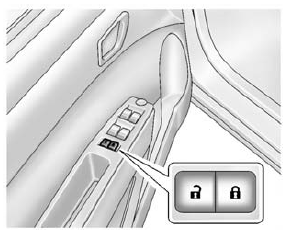
To lock or unlock the doors from inside the vehicle:
- Press or
, if equipped. - Use the lock knob on the top of the door panel.
See Door Locks on page 2-5 and Central Locking System on page 2-6.
 Remote Keyless Entry (RKE) System
For vehicles with the RKE transmitter, it may work up to 60m (195 ft) away from
the vehicle.
Press the key release button to extend the key blade. The key can be used for
the ignition and all ...
 Liftgate
To lock or unlock the liftgate from the outside, use the key in the liftgate
lock.
If equipped, press on the RKE transmitter
to unlock all doors and press to lock.
See Remote Keyless Entry (R ...
Other materials:
Uniform Tire Quality Grading
The following information relates to the system developed by the United States
National Highway Traffic Safety Administration (NHTSA), which grades tires by treadwear,
traction, and temperature performance. This applies only to vehicles sold in the
United States. The grades are molded on the s ...
Driving on Wet Roads
Rain and wet roads can reduce vehicle traction and affect your ability to stop
and accelerate.
Always drive slower in these types of driving conditions and avoid driving through
large puddles and deep-standing or flowing water.
Warning
Wet brakes can cause crashes.
They might not work as wel ...
Air Vents
Adjustable air vents are in the center and on the side of the instrument panel.
Move the slats to change the direction of the airflow. The center air vent does
not close completely.
Press the cover of the side air vents to open. Turn open slats clockwise or counterclockwise
to direct a ...
