
Chevrolet Spark Owners Manual: Remote Keyless Entry (RKE) System
For vehicles with the RKE transmitter, it may work up to 60m (195 ft) away from the vehicle.
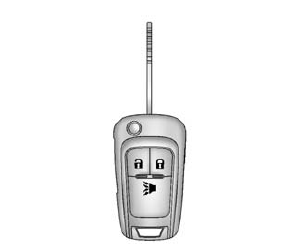
Press the key release button to extend the key blade. The key can be used for the ignition and all locks.
Press  to unlock the driver door
or all doors and the liftgate.
Press  to lock all doors and the
liftgate.
Lock and unlock feedback can be personalized. See Vehicle Personalization on page 5-27.
Press and release  to initiate vehicle
locator.
Press and hold for at least three
seconds to sound the panic alarm.
Press  again to cancel the panic
alarm.
See Keys on page 2-1 and Remote Keyless Entry (RKE) System Operation on page 2-3.
 Initial Drive Information
This section provides a brief overview about some of the important features that
may or may not be on your specific vehicle.
For more detailed information, refer to each of the features which can b ...
 Door Locks
To lock or unlock the doors from outside the vehicle:
Use the key in the driver door to lock and unlock the door.
Press or
on the Remote Keyless Entry (RKE)
transmitter, if equipped ...
Other materials:
Connections
The required specific Onstar subscription plan includes the services that follow
to help customers stay connected.
For coverage maps, see www.onstar.com (U.S.) or www.onstar.ca (Canada).
WiFi Connectivity (If Equipped)
The vehicle has a WiFi hotspot that provides a high-speed, wireless Internet ...
Tire Rotation
Tires should be rotated every 12 000 km (7,500 mi). The first rotation is the
most important.
See Maintenance Schedule on page 11-3.
Tires are rotated to achieve a more uniform wear for all tires.
Anytime unusual wear is noticed, rotate the tires as soon as possible, check
for proper tire inf ...
Exterior Lighting
The exterior lamp control is on the turn signal lever on the left side of the
steering column.
There are four positions:
Turns on the headlamps together with
the parking lamps and instrument panel lights.
Turns on the parking lamps including
all lamps, except the headlamps.
Turns the ...
