
Chevrolet Spark Owners Manual: Passenger Compartment Air Filter
The filter reduces the dust, pollen, and other airborne irritants from outside air that is pulled into the vehicle.
The filter should be replaced as part of routine scheduled maintenance. See Maintenance Schedule on page 11-3. To find out what type of filter to use, see Maintenance Replacement Parts on page 11-13.
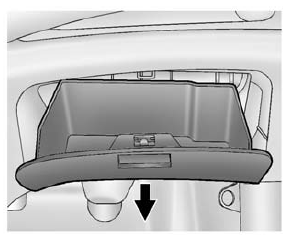
- Open the glove box completely and pull it up by each side to remove.
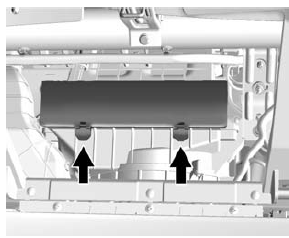
- Push the two tabs upward and release the latches holding the service door. Lift the service door.
- Remove the old air filter.
- Install the new air filter.
- Close the service door and latches.
- Reinstall the glove box.
See your dealer if additional assistance is needed.
 Air Intake
The air intake at the base of the windshield under the hood must be kept clear
to allow the flow of air into the vehicle. Clear away any ice, snow, or leaves. ...

Other materials:
Wheel Replacement
Replace any wheel that is bent, cracked, or badly rusted or corroded. If wheel
nuts keep coming loose, the wheel, wheel bolts, and wheel nuts should be replaced.
If the wheel leaks air, replace it.
Some aluminum wheels can be repaired. See your dealer if any of these conditions
exist.
Your de ...
Daytime Running Lamps (DRL)
DRL can make it easier for others to see the front of your vehicle during the
day. Fully functional DRL are required on all vehicles first sold in Canada.
The DRL system makes the headlamps come on when the following conditions are
met:
The ignition is on.
The exterior lamp control is in ...
AM-FM Radio
Playing the Radio without Touchscreen
Audio Source Menu
/VOL (Power/Volume): Press to turn
the system on and off. Turn to increase or decrease the volume.
MENU/TUNE: Turn to change the radio station.
RADIO/BAND: Press to select AM and FM.
INFO: Press to display additional information that ma ...
