
Chevrolet Spark Owners Manual: Windshield Wiper/Washer
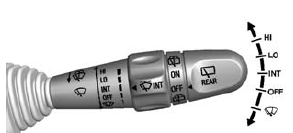
The windshield wiper/washer lever is on the right side of the steering column.
Move the lever to one of the following positions: HI: Use for fast wipes.
LO: Use for slow wipes.
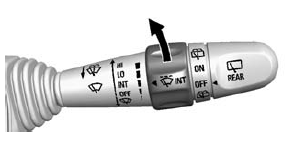
INT (Intermittent Wipes): Move the lever up to INT for intermittent wipes, then
turn the  INT band up for more frequent
wipes or down for less frequent wipes.
OFF: Use to turn the wipers off.
 (Mist): For a single wipe, briefly
move the wiper lever down. For several wipes, hold the wiper lever down.
Clear snow and ice from the wiper blades before using them. If frozen to the windshield, carefully loosen or thaw them. Replace damaged wiper blades. See Wiper Blade Replacement on page 10-24.
Heavy snow or ice can overload the wiper motor. A circuit breaker will stop the motor until it cools down.
Wiper Parking
If the ignition is turned to LOCK/ OFF while the wipers are on LO, HI, or INT, they will immediately stop.
If the windshield wiper lever is then moved to OFF before the driver door is opened or within 10 minutes, the wipers will restart and move to the base of the windshield.
If the ignition is turned to LOCK/ OFF while the wipers are performing wipes due to windshield washing, the wipers continue to run until they reach the base of the windshield.
Windshield Washer
Pull the windshield wiper lever toward you to spray windshield washer fluid and activate the wipers.
The wipers will continue until the lever is released or the maximum wash time is reached.
When the windshield wiper lever is released, additional wipes may occur depending on how long the windshield washer had been activated. See Washer Fluid on page 10-19 for information on filling the windshield washer fluid reservoir.
Warning
In freezing weather, do not use the washer until the windshield is warmed. Otherwise the washer fluid can form ice on the windshield, blocking your vision.
 Steering Wheel Controls
If equipped with audio steering wheel controls, some audio controls can be adjusted
at the steering wheel.
SEEK or SEEK
(Next/ Previous): Press to go to the
next or previous radio station, ...
 Rear Window Wiper/ Washer
If equipped with the rear wiper/ washer, the controls are on the end of the windshield
wiper lever.
Turn the rear wiper/washer band to operate the rear window wiper/ washer.
ON: Turns the rear ...
Other materials:
Interior Care
To prevent dirt particle abrasions, regularly clean the vehicle's interior.
Immediately remove any soils. Note that newspapers or dark garments that can
transfer color to home furnishings can also permanently transfer color to the vehicle's
interior.
Use a soft bristle brush to remove ...
Uniform Tire Quality Grading
The following information relates to the system developed by the United States
National Highway Traffic Safety Administration (NHTSA), which grades tires by treadwear,
traction, and temperature performance. This applies only to vehicles sold in the
United States. The grades are molded on the s ...
Customer Satisfaction Procedure
Your satisfaction and goodwill are important to your dealer and to Chevrolet.
Normally, any concerns with the sales transaction or the operation of the vehicle
will be resolved by your dealer's sales or service departments. Sometimes, however,
despite the best intentions of all concerned, ...
