
Chevrolet Spark Owners Manual: Shopping Bag Hooks
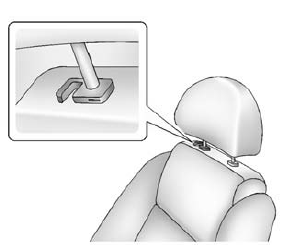
The vehicle has a shopping bag hook under the front seat head restraints. Lift the head restraints to access the hook.
Cargo Net
The cargo net is in the trunk and used to store small loads. The net should not be used to store heavy loads.
 Cargo Cover
Warning
An unsecured cargo cover could strike people in a sudden stop
or turn, or in a crash. Store the cargo cover securely or remove it from the vehicle.
The cargo cover can be used to cover ite ...
 Roof Rack System
Warning
If something is carried on top of the vehicle that is longer or
wider than the roof rack-like paneling, plywood, or a mattress-the wind can catch
it while the vehicle is being driven. The ...
Other materials:
Passenger Compartment Air Filter
The filter reduces the dust, pollen, and other airborne irritants from outside
air that is pulled into the vehicle.
The filter should be replaced as part of routine scheduled maintenance. See Maintenance
Schedule on page 11-3. To find out what type of filter to use, see Maintenance Replacement ...
Instrument Panel Fuse Block
The instrument panel fuse block is on the underside of the driver side instrument
panel.
Open the fuse panel door by pulling out at the top.
Remove the fuse panel door diagonally.
The vehicle may not be equipped with all of the fuses, relays, and features shown.
...
Tire Pressure Monitor
This vehicle may have a Tire Pressure Monitor System (TPMS).
The low tire pressure warning light
alerts to a significant loss in pressure of one of the vehicle's tires. If the warning
light comes on, stop as soon as possible and inflate the tires to the recommended
pressure shown on the T ...
