
Chevrolet Spark Owners Manual: Safety Locks
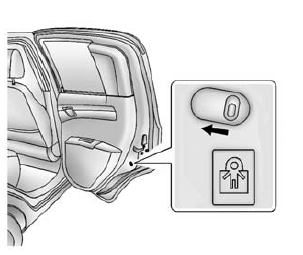
The vehicle has rear door safety locks on each rear door that prevent passengers from opening the rear doors from the inside.
Using the Rear Door Safety Lock
- Move the lever up to lock.
- Close the door.
- Repeat Steps 1 and 2 for the other rear door lock.
Caution
Pulling the inside door handle while the rear door safety locks are engaged could damage your vehicle. Do not pull the inside door handle while the rear door safety locks are engaged.
The rear doors on the vehicle cannot be opened from the inside while this feature is in use.
Opening a Rear Door When the Safety Lock Is On
- Unlock the door from the inside.
- Open the door from the outside.
For the rear doors to open from the inside, the safety locks have to be moved back to the unlock position.
Canceling a Rear Door Safety Lock
- Unlock the door from the inside and open the door from the outside.
- Move the lever down to unlock.
- Repeat Steps 1 and 2 for the other rear door lock.
The rear door locks can now be locked and unlocked normally.
 Lockout Protection
When locking is requested with the driver door open and the key in the ignition,
all the doors will lock and then the driver door will unlock. This can be manually
overridden by pressing and holdi ...
 Doors
Doors
Liftgate
Warning
Exhaust gases can enter the vehicle if it is driven with the liftgate,
hatch/trunk open, or with any objects that pass through the seal between the body
and the hatch/trunk or l ...
Other materials:
Seat Adjustment
Manual Seats
To adjust the seat:
Lift the bar under the front edge of the seat cushion to unlock the seat.
Slide the seat to the desired position and release the bar.
Try to move the seat back and forth to be sure it is locked in place.
See Seat Adjustment on page 3-5.
Seat Height A ...
Airbag System Check
The airbag system does not need regularly scheduled maintenance or replacement.
Make sure the airbag readiness light is working. See Airbag Readiness Light on page
5-11.
Caution
If an airbag covering is damaged, opened, or broken, the airbag
may not work properly. Do not open or break the ai ...
Cooling System
The cooling system allows the engine to maintain the correct working temperature.
Engine Coolant Surge Tank and Pressure Cap
Engine Cooling Fan (Out of View)
Warning
An electric engine cooling fan under the hood can start up
even when the engine is not running and can cause injur ...
