
Chevrolet Spark Owners Manual: Passenger Compartment Air Filter
The filter reduces the dust, pollen, and other airborne irritants from outside air that is pulled into the vehicle.
The filter should be replaced as part of routine scheduled maintenance. See Maintenance Schedule on page 11-3. To find out what type of filter to use, see Maintenance Replacement Parts on page 11-13.
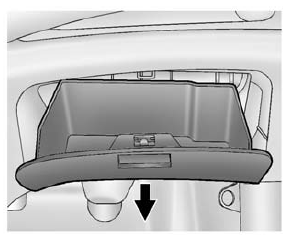
- Open the glove box completely and pull it up by each side to remove.
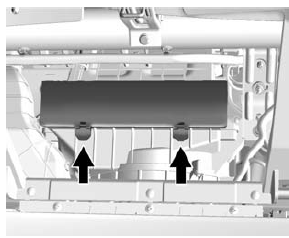
- Push the two tabs upward and release the latches holding the service door. Lift the service door.
- Remove the old air filter.
- Install the new air filter.
- Close the service door and latches.
- Reinstall the glove box.
See your dealer if additional assistance is needed.
 Air Intake
The air intake at the base of the windshield under the hood must be kept clear
to allow the flow of air into the vehicle. Clear away any ice, snow, or leaves. ...

Other materials:
Charging System Light
This light will come on briefly
when the ignition is turned on, and the engine is not running, as a check to show
it is working.
It should go out when the engine is started. If it stays on, or comes on while
driving, there may be a problem with the electrical charging system. Have it checked ...
Reclining Seatbacks
Warning
If either seatback is not locked, it could move forward in a sudden
stop or crash. That could cause injury to the person sitting there.
Always push and pull on the seatbacks to be sure they are locked.
To recline the seatback:
Lift the lever.
Move the seatback to the desired p ...
Interior Glass
To clean, use a terry cloth fabric dampened with water. Wipe droplets left behind
with a clean dry cloth.
Commercial glass cleaners may be used, if necessary, after cleaning the interior
glass with plain water.
Caution
To prevent scratching, never use abrasive cleaners on automotive
glass. ...
