
Chevrolet Spark Owners Manual: Fog Lamps
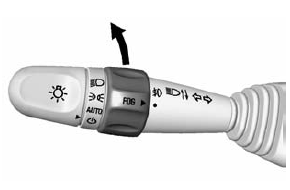
If equipped with fog lamps, they are controlled by the
 band on the middle of the turn signal
lever.
To use the fog lamps, the ignition must be turned on and the low-beam headlamps or parking lamps must be on.
Turn the band to  to turn the fog
lamps on. The band automatically returns to its starting position when released.
The fog lamp indicator light comes on in the display on top of the center stack.
See Front Fog Lamp Light on page 5-21.
To turn the fog lamps off, turn the band to
 again. The fog lamp indicator light
will go off.
The fog lamps will also turn off when the high-beam headlamps are turned on. When the high-beam headlamps are turned off, the fog lamps will turn on again.
Some localities have laws that require the headlamps to be on along with the fog lamps.
 Turn and Lane-Change Signals
Move the lever all the way up or down to signal a turn.
An arrow on the instrument cluster flashes in the direction of the turn or lane
change.
Raise or lower the lever until the arrow starts ...

Other materials:
Driver Information Center (DIC)
The DIC has different displays, which can be accessed by using the DIC buttons
on the right side of the instrument cluster. The DIC displays trip, fuel, and warning
messages if a system problem is detected.
DIC Buttons
MENU: Press to display the DIC menus.
or
: Use to scroll through th ...
New Vehicle Break-In
Caution
The vehicle does not need an elaborate break-in. But it will perform
better in the long run if you follow these guidelines:
Do not drive at any one constant speed, fast or slow, for
the first 805 km (500 mi).
Do not make full-throttle starts. Avoid downshifting to brake or slow t ...
Blizzard Conditions
Being stuck in snow can be a serious situation. Stay with the vehicle unless
there is help nearby.
If possible, use Roadside Assistance. See Roadside Assistance Program on page
13-5.
To get help and keep everyone in the vehicle safe:
Turn on the hazard warning flashers.
Tie a red cloth t ...
