
Chevrolet Spark Owners Manual: Floor Mats
Warning
If a floor mat is the wrong size or is not properly installed, it can interfere with the pedals.
Interference with the pedals can cause unintended acceleration and/or increased stopping distance which can cause a crash and injury. Make sure the floor mat does not interfere with the pedals.
Use the following guidelines for proper floor mat usage:
- The original equipment floor mats were designed for your vehicle. If the floor mats need replacing, it is recommended that GM certified floor mats be purchased. Non-GM floor mats may not fit properly and may interfere with the pedals. Always check that the floor mats do not interfere with the pedals.
- Do not use a floor mat if the vehicle is not equipped with a floor mat retainer on the driver side floor.
- Use the floor mat with the correct side up. Do not turn it over.
- Do not place anything on top of the driver side floor mat.
- Use only a single floor mat on the driver side.
- Do not place one floor mat on top of another.
Removing and Replacing the Floor Mats
Pull up on the rear of the floor mat to unlock each retainer and remove.
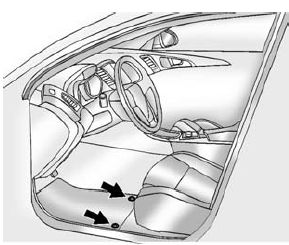
Reinstall by lining up the floor mat retainer openings over the carpet retainers and snap into position.
Make sure the floor mat is properly secured in place.
Verify the floor mat does not interfere with the pedals.
 Instrument Panel, Leather, Vinyl, Other Plastic Surfaces, Low Gloss Paint Surfaces
and Natural Open Pore Wood Surfaces
Instrument Panel, Leather, Vinyl, Other Plastic Surfaces, Low Gloss Paint Surfaces
and Natural Open Pore Wood Surfaces
Use a soft microfiber cloth dampened with water to remove dust and loose dirt.
For a more thorough cleaning, use a soft microfiber cloth dampened with a mild soap
solution.
Caution
Soaking or sa ...

Other materials:
OnStar Overview
Voice Command Button
Blue OnStar Button
Emergency Button
This vehicle may be equipped with a comprehensive, in-vehicle system that can
connect to a live OnStar Advisor for Emergency, Security, Navigation, Connection,
and Diagnostic Services. OnStar services may require a paid subscripti ...
Lockout Protection
When locking is requested with the driver door open and the key in the ignition,
all the doors will lock and then the driver door will unlock. This can be manually
overridden by pressing and holding
on the power door lock switch.
If Unlocked Door Anti-Lockout is turned on, the vehicle is off ...
Instrument Panel Illumination Control
This feature controls the brightness of the instrument panel controls and infotainment
display screen. The thumbwheel is to the left of the steering column on the instrument
panel.
(Instrument Panel Brightness):
Move the thumbwheel up or down to brighten or dim the instrument panel contr ...
