
Chevrolet Spark Owners Manual: Air Vents
Adjustable air vents are in the center and on the side of the instrument panel.
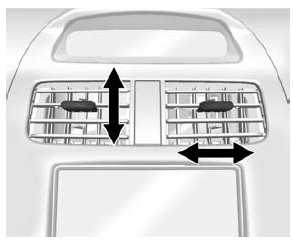
Move the slats to change the direction of the airflow. The center air vent does not close completely.
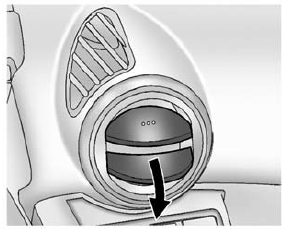
Press the cover of the side air vents to open. Turn open slats clockwise or counterclockwise to direct airflow as needed. Close the cover to stop the airflow.
Additional air vents are located beneath the windshield and the driver and passenger side door windows, and in the footwells.
These are fixed and cannot be adjusted.
Operation Tips
- Clear away any ice, snow, or leaves from air inlets at the base of the windshield that could block the flow of air into the vehicle.
- Keep the path under the front seats clear of objects to help circulate the air inside of the vehicle more effectively.
- Use of non-GM approved hood deflectors can adversely affect the performance
of the system.
Check with your dealer before adding equipment to the outside of the vehicle.
 Climate Control Systems
The heating, cooling, and ventilation for the vehicle can be controlled with
this system.
Fan Control
Air Conditioning
Recirculation
Temperature Control
Rear Window Defogger
Air De ...
 Maintenance
...
Other materials:
Traction Off Light
This light comes on briefly while
starting the engine. If it does not, have the vehicle serviced by your dealer. If
the system is working normally, the indicator light then turns off.
The traction off light comes on when the Traction Control System (TCS) has been
turned off by pressing and re ...
Dolly Towing
To tow the vehicle with the two rear wheels on the ground and the front wheels
on a dolly:
Put the front wheels on a dolly.
Shift the automatic transmission into P (Park) or a manual transmission
into 1 (First) gear.
Set the parking brake.
Clamp the steering wheel in a straight-ah ...
Cleaning High Gloss Surfaces and Vehicle Information and Radio Displays
For vehicles with high gloss surfaces or vehicle displays, use a microfiber cloth
to wipe surfaces.
Before wiping the surface with the microfiber cloth, use a soft bristle brush
to remove dirt that could scratch the surface. Then use the microfiber cloth by
gently rubbing to clean. Never use ...
