
Chevrolet Spark Owners Manual: Vehicle Data
Capacities and Specifications
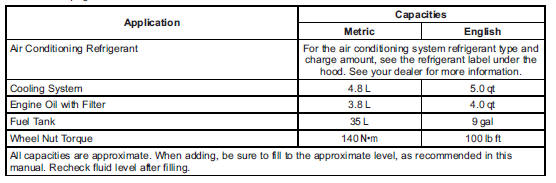
The following approximate capacities are given in metric and English conversions. See Recommended Fluids and Lubricants on page 11-12 for more information.

Engine Drive Belt Routing

 Service Parts Identification Label
This label, on the inside of the glove box, has the following information:
Vehicle Identification Number (VIN).
Model designation.
Paint information.
Production options and special equipment ...

Other materials:
Uniform Tire Quality Grading
The following information relates to the system developed by the United States
National Highway Traffic Safety Administration (NHTSA), which grades tires by treadwear,
traction, and temperature performance. This applies only to vehicles sold in the
United States. The grades are molded on the s ...
Mirror Adjustment
Exterior Mirrors
Manual Outside Mirrors
If equipped, move the control up, down, or side to side to adjust the mirror.
See Manual Mirrors on page 2-13.
Power Outside Mirrors
If equipped, move the selector switch to L (Left) or R (Right) to choose
the driver or passenger mirror.
M ...
Washer Fluid
What to Use
When windshield washer fluid is needed, be sure to read the manufacturer's instructions
before use. If operating the vehicle in an area where the temperature may fall below
freezing, use a fluid that has sufficient protection against freezing.
Adding Washer Fluid
Open the cap ...
