
Chevrolet Spark Owners Manual: Engine Air Cleaner/Filter
The engine air cleaner/filter is in the engine compartment on the driver side of the vehicle. See Engine Compartment Overview on page 10-7 for more information on location.
When to Inspect the Engine Air Cleaner/Filter
Inspect the air cleaner/filter at the scheduled maintenance intervals.
See Maintenance Schedule on page 11-3. If you are driving in dusty/dirty conditions, inspect the filter at each engine oil change.
How to Inspect the Engine Air Cleaner/Filter
To inspect the engine air cleaner/ filter, remove the filter from the vehicle and lightly shake the filter to release loose dust and dirt. If the filter remains covered with dirt, a new filter is required.
To inspect or replace the air cleaner/ filter:
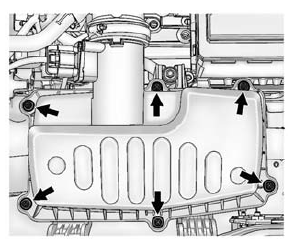
- Remove the six screws and lift the cover out of the assembly.
- Inspect or replace the engine air cleaner/filter.
- Lower the cover and secure with the six screws.
See Maintenance Schedule on page 11-3 for replacement intervals.
Warning
Operating the engine with the air cleaner/filter off can cause you or others to be burned. The air cleaner not only cleans the air; it helps to stop flames if the engine backfires. Use caution when working on the engine and do not drive with the air cleaner/filter off.
Caution
If the air cleaner/filter is off, dirt can easily get into the engine, which could damage it. Always have the air cleaner/filter in place when you are driving.
 Hydraulic Clutch
For vehicles with a manual transmission, it is not necessary to regularly check
brake/clutch fluid unless there is a leak suspected.
Adding fluid will not correct a leak.
A fluid loss in this syst ...
 Cooling System
The cooling system allows the engine to maintain the correct working temperature.
Engine Coolant Surge Tank and Pressure Cap
Engine Cooling Fan (Out of View)
Warning
An electric engin ...
Other materials:
Insuring the Vehicle
Protect your investment in the GM vehicle with comprehensive and collision insurance
coverage. There are significant differences in the quality of coverage afforded
by various insurance policy terms.
Many insurance policies provide reduced protection to the GM vehicle by limiting
compensation ...
Cruise Control Light
For vehicles with cruise control,
the cruise control light is white when the cruise control is on and ready, and turns
green when the cruise control is set and active.
The light turns off when the cruise control is turned off. See Cruise Control
on page 9-30.
Door Ajar Light
This light come ...
Rear Seats
Folding the Seatback
Either side of the seatback can be folded down for more cargo space.
Fold a seatback only when the vehicle is not moving.
Caution
Folding a rear seat with the safety belts still fastened may cause
damage to the seat or the safety belts. Always unbuckle the safety belts and ...
