
Chevrolet Spark Owners Manual: Head Restraint Removal and Reinstallation
The rear outboard head restraints can be removed if they interfere with the proper installation of the child restraint.
To remove the head restraint:
- Partially fold the seatback forward. See Rear Seats on page 3-8 for additional information.
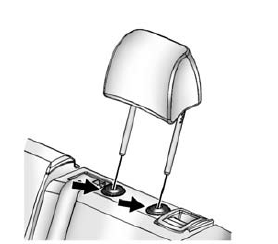
- Press both buttons on the head restraint posts at the same time, and pull up on the head restraint.
- Store the head restraint in the cargo area of the vehicle inside the cargo net.
- When the child restraint is removed, reinstall the head restraint before the seating position is used.
Warning
With head restraints that are not installed and adjusted properly, there is a greater chance that occupants will suffer a neck/ spinal injury in a crash. Do not drive until the head restraints for all occupants are installed and adjusted properly.
To reinstall the head restraint:
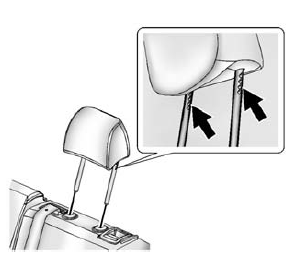
- Insert the head restraint posts into the holes in the top of the seatback. The notches on the posts must face the driver side of the vehicle.
- Push the head restraint down.
If necessary, press the height adjustment release button to further lower the head restraint.
See Head Restraints on page 3-2.
- Try to move the head restraint to make sure that it is locked in place.
 Securing a Child Restraint Designed for the LATCH System
Warning
If a LATCH-type child restraint is not attached to anchors or
with the safety belt, the child restraint will not be able to protect the child
correctly. In a crash, the child could be ser ...
 Replacing LATCH System Parts After a Crash
Warning
A crash can damage the LATCH system in the vehicle. A damaged
LATCH system may not properly secure the child restraint, resulting in serious injury
or even death in a crash. To help make ...
Other materials:
Safety System Check
Now and then, check that the safety belt reminder light, safety belts, buckles,
latch plates, retractors, and anchorages are all working properly.
Look for any other loose or damaged safety belt system parts that might keep
a safety belt system from doing its job. See your dealer to have it rep ...
OnStar Additional Information
Transferring Service
Press to request account transfer
eligibility information. The Advisor can assist in canceling or removing account
information.
Selling/Transferring the Vehicle
Call 1-888-4-ONSTAR immediately to terminate your OnStar services if the vehicle
is disposed of, sold, trans ...
Ignition Positions
The ignition switch has four different positions.
The uplevel key must be fully extended to start the vehicle.
To shift out of P (Park), the ignition must be in ON/RUN and the regular brake
pedal applied.
1 (STOPPING THE ENGINE/LOCK/ OFF): When the vehicle is stopped, turn the ignition
sw ...
