
Chevrolet Spark Owners Manual: Safety Locks
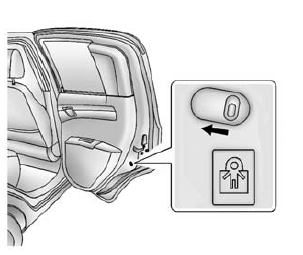
The vehicle has rear door safety locks on each rear door that prevent passengers from opening the rear doors from the inside.
Using the Rear Door Safety Lock
- Move the lever up to lock.
- Close the door.
- Repeat Steps 1 and 2 for the other rear door lock.
Caution
Pulling the inside door handle while the rear door safety locks are engaged could damage your vehicle. Do not pull the inside door handle while the rear door safety locks are engaged.
The rear doors on the vehicle cannot be opened from the inside while this feature is in use.
Opening a Rear Door When the Safety Lock Is On
- Unlock the door from the inside.
- Open the door from the outside.
For the rear doors to open from the inside, the safety locks have to be moved back to the unlock position.
Canceling a Rear Door Safety Lock
- Unlock the door from the inside and open the door from the outside.
- Move the lever down to unlock.
- Repeat Steps 1 and 2 for the other rear door lock.
The rear door locks can now be locked and unlocked normally.
 Lockout Protection
When locking is requested with the driver door open and the key in the ignition,
all the doors will lock and then the driver door will unlock. This can be manually
overridden by pressing and holdi ...
 Doors
Doors
Liftgate
Warning
Exhaust gases can enter the vehicle if it is driven with the liftgate,
hatch/trunk open, or with any objects that pass through the seal between the body
and the hatch/trunk or l ...
Other materials:
Connecting a USB Storage Device or iPod/iPhone
To connect a USB storage device, connect the device to the USB port.
To connect an iPod/iPhone, connect one end of the device’s cable to the iPod/iPhone
and the other end to the USB port.
The iPod/iPhone charges while it is connected to the vehicle if the vehicle is
in ACC/ACCESSORY, ON/RUN. S ...
If a Crash Occurs
If there has been an injury, call emergency services for help. Do not leave the
scene of a crash until all matters have been taken care of.
Move the vehicle only if its position puts you in danger, or you are instructed
to move it by a police officer.
Give only the necessary information to pol ...
Rear Seats
Folding the Seatback
Either side of the seatback can be folded down for more cargo space.
Fold a seatback only when the vehicle is not moving.
Caution
Folding a rear seat with the safety belts still fastened may cause
damage to the seat or the safety belts. Always unbuckle the safety belts and ...
