
Chevrolet Spark Owners Manual: Filling the Tank
Warning
Fuel vapors and fuel fires burn violently and can cause injury or death.
- To help avoid injuries to you and others, read and follow all the instructions on the fuel pump island.
- Turn off the engine when refueling.
- Keep sparks, flames, and smoking materials away from fuel.
- Do not leave the fuel pump unattended.
- Do not reenter the vehicle while pumping fuel.
- Keep children away from the fuel pump and never let children pump fuel.
- Fuel can spray out if the fuel cap is opened too quickly.
This spray can happen if the tank is nearly full, and is more likely in hot weather.
Open the fuel cap slowly and wait for any hiss noise to stop then unscrew the cap all the way.
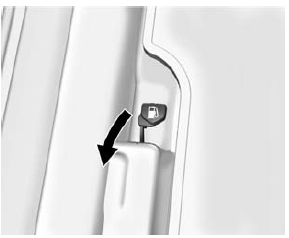
The tethered fuel cap is behind a hinged fuel door on the passenger side of the vehicle. To open the fuel filler door, lift the fuel door release lever. The lever is on the floor, on the left front side of the driver seat.
The fuel door is unlocked when the vehicle is unlocked. Locking the vehicle locks the fuel door.
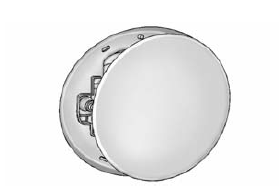
To remove the fuel cap, turn it slowly counterclockwise.
Be careful not to spill fuel. Do not top off or overfill the tank and wait a few seconds after you have finished pumping before removing the nozzle. Clean fuel from painted surfaces as soon as possible. See Exterior Care on page 10-70.
When replacing the fuel cap, turn it clockwise until it clicks. Make sure the cap is fully installed. The diagnostic system can determine if the fuel cap has been left off or improperly installed. This would allow fuel to evaporate into the atmosphere. See Malfunction Indicator Lamp on page 5-12.
Push the fuel door closed until it latches.
Warning
If a fire starts while you are refueling, do not remove the nozzle. Shut off the flow of fuel by shutting off the pump or by notifying the station attendant.
Leave the area immediately.
Caution
If a new fuel cap is needed, be sure to get the right type of cap from your dealer. The wrong type of fuel cap may not fit properly, may cause the malfunction indicator lamp to light, and could damage the fuel tank and emissions system. See Malfunction Indicator Lamp on page 5-12.
 Fuel Additives
To keep fuel systems clean, TOP TIER Detergent Gasoline is recommended. See Fuel
on page 9-35.
If TOP TIER Detergent Gasoline is not available, one bottle of Fuel System Treatment
PLUS added to t ...
 Filling a Portable Fuel Container
Warning
Filling a portable fuel container while it is in the vehicle can
cause fuel vapors that can ignite either by static electricity or other means. You
or others could be badly burned and the ...
Other materials:
Lap-Shoulder Belt
All seating positions in the vehicle have a lap-shoulder belt.
The following instructions explain how to wear a lap-shoulder belt properly.
Adjust the seat, if the seat is adjustable, so you can sit up straight.
To see how, see “Seats” in the Index.
Pick up the latch plate and pull ...
Cargo Cover
Warning
An unsecured cargo cover could strike people in a sudden stop
or turn, or in a crash. Store the cargo cover securely or remove it from the vehicle.
The cargo cover can be used to cover items in the rear of the vehicle.
To remove the cargo cover:
Remove both of the cords (1) from ...
Keys
Warning
Leaving children in a vehicle with the ignition key is dangerous
and children or others could be seriously injured or killed. They could operate
the power windows or other controls or make the vehicle move. The windows will function
with the keys in the ignition, and children or other ...
