
Chevrolet Spark Owners Manual: Interior Lighting
Dome Lamps
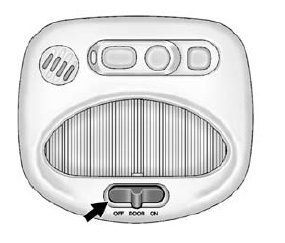
The dome lamp controls are in the overhead console.
Move the control to change the lamp setting.
OFF: Turns the lamps off, even when a door is open.
DOOR: Turns the lamps on automatically when a door is opened.
ON: Turns on the dome lamps.
For more information about interior lighting, see Instrument Panel Illumination Control on page 6-5 or Courtesy Lamps on page 6-5.
 Steering Wheel Adjustment
To adjust the steering wheel:
Pull the lever down.
Move the steering wheel up or down.
Pull the lever up to lock the steering wheel in place.
Do not adjust the steering wheel while driv ...
 Exterior Lighting
The exterior lamp control is on the turn signal lever on the left side of the
steering column.
There are four positions:
Turns on the headlamps together with
the parking lamps and instrument ...
Other materials:
Cruise Control
If equipped with cruise control, the vehicle can maintain a speed of about 40
km/h (25 mph) or more without keeping your foot on the accelerator. Cruise control
does not work at speeds below 40 km/h (25 mph).
Warning
Cruise control can be dangerous where you cannot drive safely
at a steady s ...
Passenger Compartment Air Filter
The filter reduces the dust, pollen, and other airborne irritants from outside
air that is pulled into the vehicle.
The filter should be replaced as part of routine scheduled maintenance. See Maintenance
Schedule on page 11-3. To find out what type of filter to use, see Maintenance Replacement ...
Securing a Child Restraint Designed for the LATCH System
Warning
If a LATCH-type child restraint is not attached to anchors or
with the safety belt, the child restraint will not be able to protect the child
correctly. In a crash, the child could be seriously injured or killed. Install a
LATCH-type child restraint properly using the anchors, or use ...
