
Chevrolet Spark Owners Manual: Vehicle Identification Number (VIN)
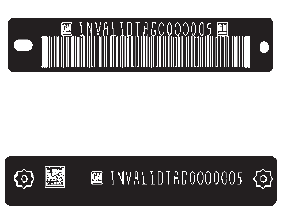
This legal identifier is in the front corner of the instrument panel, on the left side of the vehicle. It can be seen through the windshield from outside. The VIN also appears on the Vehicle Certification and Service Parts labels and certificates of title and registration.
Engine Identification
The eighth character in the VIN is the engine code. This code identifies the vehicle's engine, specifications, and replacement parts. See “Engine Specifications” under Capacities and Specifications on page 12-2 for the vehicle's engine code.

 Service Parts Identification Label
This label, on the inside of the glove box, has the following information:
Vehicle Identification Number (VIN).
Model designation.
Paint information.
Production options and special equipment ...
Other materials:
Tires
Every new GM vehicle has high-quality tires made by a leading tire manufacturer.
See the warranty manual for information regarding the tire warranty and where to
get service. For additional information refer to the tire manufacturer.
Warning
Poorly maintained and improperly used tires are d ...
Hill Start Assist (HSA)
This vehicle has an HSA feature, which may be useful when the vehicle is stopped
on a grade sufficient enough to activate HSA.
This feature is designed to prevent the vehicle from rolling, either forward
or rearward, during vehicle drive off. After the driver completely stops and holds
the ve ...
Starter Switch Check
Warning
When you are doing this inspection, the vehicle could move suddenly.
If the vehicle moves, you or others could be injured.
Before starting this check, be sure there is enough room around the vehicle.
Apply both the parking brake and the regular brake.Do not use the accelerator
pe ...
