
Chevrolet Spark Owners Manual: Door Locks
To lock or unlock the doors from outside the vehicle:
- Use the key in the driver door to lock and unlock the door.
- Press
 or
or
 on the Remote Keyless Entry (RKE)
transmitter, if equipped, to lock and unlock the doors. See Remote Keyless Entry (RKE) System Operation on page 2-3.
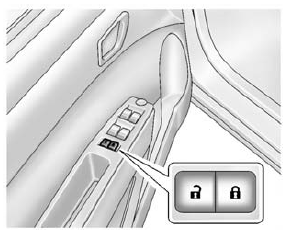
To lock or unlock the doors from inside the vehicle:
- Press or
, if equipped. - Use the lock knob on the top of the door panel.
See Door Locks on page 2-5 and Central Locking System on page 2-6.
 Remote Keyless Entry (RKE) System
For vehicles with the RKE transmitter, it may work up to 60m (195 ft) away from
the vehicle.
Press the key release button to extend the key blade. The key can be used for
the ignition and all ...
 Liftgate
To lock or unlock the liftgate from the outside, use the key in the liftgate
lock.
If equipped, press on the RKE transmitter
to unlock all doors and press to lock.
See Remote Keyless Entry (R ...
Other materials:
Fog Lamps
If equipped with fog lamps, they are controlled by the
band on the middle of the turn signal
lever.
To use the fog lamps, the ignition must be turned on and the low-beam headlamps
or parking lamps must be on.
Turn the band to to turn the fog
lamps on. The band automatically returns to ...
Exit Lighting
If the dome lamps are in the DOOR position, they come on automatically when the
key is removed from the ignition. The exterior lamps and dome lamps remain on after
the door is closed for a set amount of time, then automatically turn off.
The headlamps, parking lamps, and back-up lamps will turn ...
Automatic Door Locks
If equipped, the vehicle is programmed so that when the doors are closed, the
ignition is on, and the shift lever is moved out of P (Park) for automatic transmissions,
or the vehicle speed is above 13 km/h (8 mph) for manual transmissions, the doors
and the liftgate will lock.
To unlock the d ...
