
Chevrolet Spark Owners Manual: Dome Lamps
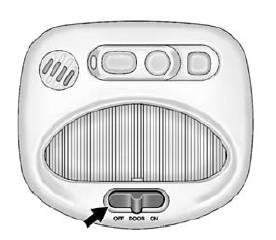
The dome lamp controls are in the overhead console.
Move the control to change the lamp setting.
OFF: Turns the lamps off, even when a door is open.
DOOR: Turns the lamps on automatically when a door is opened.
ON: Turns on the dome lamps.
 Instrument Panel Illumination Control
This feature controls the brightness of the instrument panel controls and infotainment
display screen. The thumbwheel is to the left of the steering column on the instrument
panel.
(Instrume ...

Other materials:
Brake Fluid
The brake/clutch master cylinder
reservoir is filled with DOT 4 brake fluid as indicated on the reservoir cap. See
Engine Compartment Overview on page 10-7 for the location of the reservoir.
There are only two reasons why the brake fluid level in the reservoir might go
down:
The brake fl ...
Antilock Brake System (ABS) Warning Light
This light comes on briefly when
the engine is started.
If the light stays on, turn the ignition to LOCK/OFF or if the light comes on,
stop as soon as possible and turn the ignition off. Then start the engine again
to reset the system.
If the light still stays on, or comes on again while dr ...
Engine Oil Life System
When to Change Engine Oil
This vehicle has a computer system that indicates when to change the engine oil
and filter. This is based on a combination of factors which include engine revolutions,
engine temperature, and miles driven.
Based on driving conditions, the mileage at which an oil chang ...
