
Chevrolet Spark Owners Manual: Brake System Warning Light
The vehicle brake system consists of two hydraulic circuits. If one circuit is not working, the remaining circuit can still work to stop the vehicle. For normal braking performance, both circuits need to be working If the warning light comes on, there is a brake problem. Have the brake system inspected right away.
Warning
The brake system might not be working properly if the brake system warning light is on.
Driving with the brake system warning light on can lead to a crash. If the light is still on after the vehicle has been pulled off the road and carefully stopped, have the vehicle towed for service.
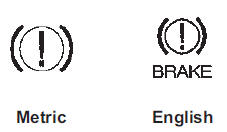 This light should come on briefly
when the ignition is turned to ON.
If it does not come on then, have it fixed so it will be ready to warn if there is a problem.
When the ignition is on, the brake system warning light will also come on when the parking brake is set.
The light will stay on if the parking brake does not fully release. If it stays on after the parking brake is fully released, it means there is a brake problem.
If the light comes on while driving, carefully pull off the road and stop.
The pedal may be harder to push or may go closer to the floor. It may take longer to stop. If the light is still on, have the vehicle towed for service. See Towing the Vehicle on page 10-67.
 Service Vehicle Soon Light
For vehicles with this light, it
comes on if a condition exists that may require the vehicle to be taken in for service.
If the light comes on, take the vehicle to your dealer for service as soon a ...
 Antilock Brake System (ABS) Warning Light
This light comes on briefly when
the engine is started.
If the light stays on, turn the ignition to LOCK/OFF or if the light comes on,
stop as soon as possible and turn the ignition off. Then st ...
Other materials:
Safety Belt Use During Pregnancy
Safety belts work for everyone, including pregnant women. Like all occupants,
they are more likely to be seriously injured if they do not wear safety belts.
A pregnant woman should wear a lap-shoulder belt, and the lap portion should
be worn as low as possible, below the rounding, throughou ...
Rear Seats
Folding the Seatback
Either side of the seatback can be folded down for more cargo space.
Fold a seatback only when the vehicle is not moving.
Caution
Folding a rear seat with the safety belts still fastened may cause
damage to the seat or the safety belts. Always unbuckle the safety belts and ...
Infotainment
Read the following pages to become familiar with these features.
Warning
Taking your eyes off the road for too long or too often while
using any infotainment feature can cause a crash. You or others could be injured
or killed. Do not give extended attention to infotainment tasks while driving. ...
