
Chevrolet Spark Owners Manual: Ride Control Systems
Traction Control/Electronic Stability Control
System Operation
The vehicle has a Traction Control System (TCS) and StabiliTrak®, an electronic stability control system.
These systems help limit wheel slip and assist the driver in maintaining control, especially on slippery road conditions.
TCS activates if it senses that any of the drive wheels are spinning or beginning to lose traction. When this happens, TCS applies the brakes to the spinning wheels and reduces engine power to limit wheel spin.
StabiliTrak activates when the vehicle senses a difference between the intended path and the direction the vehicle is actually traveling.
StabiliTrak selectively applies braking pressure to any one of the vehicle wheel brakes to assist the driver in keeping the vehicle on the intended path.
If cruise control is being used and traction control or StabiliTrak begins to limit wheel spin, cruise control will disengage. Cruise control may be turned back on when road conditions allow.
Both systems come on automatically when the vehicle is started and begins to move. The systems may be heard or felt while they are operating or while performing diagnostic checks. This is normal and does not mean there is a problem with the vehicle.
It is recommended to leave both systems on for normal driving conditions, but it may be necessary to turn TCS off if the vehicle gets stuck in sand, mud, ice, or snow.
See If the Vehicle Is Stuck on page 9-8 and “Turning the Systems Off and On” later in this section.
 The indicator light for both systems
is in the instrument cluster. This light will:
- Flash when TCS is limiting wheel spin.
- Flash when StabiliTrak is activated.
- Turn on and stay on when either system is not working.
If either system fails to turn on or to activate, a message displays in the Driver
Information Center (DIC), and  comes
comes
on and stays on to indicate that the system is inactive and is not assisting the
driver in maintaining control. The vehicle is safe to drive, but driving should
be adjusted accordingly.
If  comes on and stays on:
- Stop the vehicle.
- Turn the engine off and wait 15 seconds.
- Start the engine.
Drive the vehicle. If  comes on
and stays on, the vehicle may need more time to diagnose the problem.
If the condition persists, see your dealer.
Turning the Systems Off and On
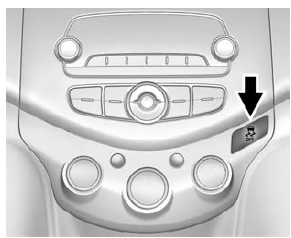
The button for TCS and StabiliTrak is on the center stack.
Caution
Do not repeatedly brake or accelerate heavily when TCS is off. The vehicle driveline could be damaged.
To turn off only TCS, press and release the
 button. The Traction Off Light
 displays in the instrument cluster.
To turn TCS on again, press and release the
 button. The Traction Off Light
displayed in the instrument cluster will turn off.
If TCS is limiting wheel spin when the
 button is pressed, the system will
not turn off until the wheels stop spinning.
To turn off both TCS and StabiliTrak, press and hold the
 button until the Traction Off Light
 and StabiliTrak Off Light
 come on and stay on in the instrument
cluster. To turn TCS and StabiliTrak on again, press and release the
 button. The Traction Off Light
 and StabiliTrak Off Light
 in the instrument cluster turn off.
Adding accessories can affect the vehicle performance. See Accessories and Modifications on page 10-3.
 Hill Start Assist (HSA)
This vehicle has an HSA feature, which may be useful when the vehicle is stopped
on a grade sufficient enough to activate HSA.
This feature is designed to prevent the vehicle from rolling, either f ...
 Cruise Control
If equipped with cruise control, the vehicle can maintain a speed of about 40
km/h (25 mph) or more without keeping your foot on the accelerator. Cruise control
does not work at speeds below 40 km ...
Other materials:
How to Add Coolant to the Coolant Surge Tank
Caution
This vehicle has a specific coolant fill procedure. Failure to
follow this procedure could cause the engine to overheat and be severely damaged.
If no problem is found, check to see if coolant is visible in the coolant surge
tank. If coolant is visible but the coolant level is not at t ...
Washing the Vehicle
To preserve the vehicle's finish, wash it often and out of direct sunlight.
Caution
Do not use petroleum-based, acidic, or abrasive cleaning agents
as they can damage the vehicle's paint, metal, or plastic parts. If damage occurs,
it would not be covered by the vehicle warranty. Approv ...
Electrical System Overload
The vehicle has fuses and circuit breakers to protect against an electrical system
overload.
When the current electrical load is too heavy, the circuit breaker opens and
closes, protecting the circuit until the current load returns to normal or the problem
is fixed. This greatly reduces the c ...
