
Chevrolet Spark Owners Manual: Rear Window Wiper/ Washer
If equipped with the rear wiper/ washer, the controls are on the end of the windshield wiper lever.
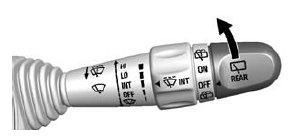
Turn the rear wiper/washer band to operate the rear window wiper/ washer.
ON: Turns the rear wiper on for continuous wipes.
OFF: Turns the rear wiper off.
 (Rear Washer): Sprays washer fluid
on the rear window. The control returns to its ON or OFF starting position when
released.
Rear Wiper Arm Assembly Protection
If the vehicle is equipped with an automatic transmission, when using an automatic car wash, move the rear wiper control to OFF to disable the rear wiper. If the transmission is in N (Neutral) and the vehicle speed is very slow, the rear wiper will automatically stop at the base of the rear window.
The wiper operations return to normal when the transmission is no longer in N (Neutral) or the vehicle speed has increased. The rear wiper will also stop when the liftgate is open.
Reverse Gear Wipes
If the rear wiper control is off, the rear wiper will automatically operate continuously when the shift lever is in R (Reverse), and the front windshield wiper is performing low or high speed wipes. If the rear wiper control is off, the shift lever is in R (Reverse), and the front windshield wiper is performing interval wipes, then the rear wiper automatically performs interval wipes.
This feature can be changed. See Vehicle Personalization on page 5-27.
The windshield washer reservoir is used for the windshield and the rear window. Check the fluid level in the reservoir if either washer is not working. See Washer Fluid on page 10-19.
 Windshield Wiper/Washer
The windshield wiper/washer lever is on the right side of the steering column.
Move the lever to one of the following positions: HI: Use for fast wipes.
LO: Use for slow wipes.
INT (Intermi ...
 Clock
Clock
Radio without Touchscreen
The infotainment system controls are used to access the time and date settings
through the menu system. See Operation on page 7-6 for information about how to
use the me ...
Other materials:
Managing the Vehicle Damage Repair Process
In the event that the vehicle requires damage repairs, GM recommends that you
take an active role in its repair. If you have a pre-determined repair facility
of choice, take the vehicle there, or have it towed there.
Specify to the facility that any required replacement collision parts be origi ...
Older Children
Older children who have outgrown booster seats should wear the vehicle safety
belts.
The manufacturer instructions that come with the booster seat state the weight
and height limitations for that booster. Use a booster seat with a lap-shoulder
belt until the child passes the fit test belo ...
Customer Satisfaction Procedure
Your satisfaction and goodwill are important to your dealer and to Chevrolet.
Normally, any concerns with the sales transaction or the operation of the vehicle
will be resolved by your dealer's sales or service departments. Sometimes, however,
despite the best intentions of all concerned, ...
