
Chevrolet Spark Owners Manual: Head Restraint Removal and Reinstallation
The rear outboard head restraints can be removed if they interfere with the proper installation of the child restraint.
To remove the head restraint:
- Partially fold the seatback forward. See Rear Seats on page 3-8 for additional information.
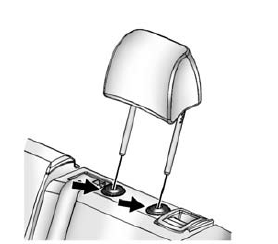
- Press both buttons on the head restraint posts at the same time, and pull up on the head restraint.
- Store the head restraint in the cargo area of the vehicle inside the cargo net.
- When the child restraint is removed, reinstall the head restraint before the seating position is used.
Warning
With head restraints that are not installed and adjusted properly, there is a greater chance that occupants will suffer a neck/ spinal injury in a crash. Do not drive until the head restraints for all occupants are installed and adjusted properly.
To reinstall the head restraint:
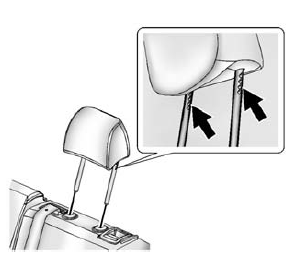
- Insert the head restraint posts into the holes in the top of the seatback. The notches on the posts must face the driver side of the vehicle.
- Push the head restraint down.
If necessary, press the height adjustment release button to further lower the head restraint.
See Head Restraints on page 3-2.
- Try to move the head restraint to make sure that it is locked in place.
 Securing a Child Restraint Designed for the LATCH System
Warning
If a LATCH-type child restraint is not attached to anchors or
with the safety belt, the child restraint will not be able to protect the child
correctly. In a crash, the child could be ser ...
 Replacing LATCH System Parts After a Crash
Warning
A crash can damage the LATCH system in the vehicle. A damaged
LATCH system may not properly secure the child restraint, resulting in serious injury
or even death in a crash. To help make ...
Other materials:
TPMS Malfunction Light
The TPMS will not function properly if one or more of the TPMS sensors are missing
or inoperable. When the system detects a malfunction, the low tire warning light
flashes for about one minute and then stays on for the remainder of the ignition
cycle. The malfunction light comes on at each ign ...
Brake System
Visually inspect brake lines and hoses for proper hook-up, binding, leaks, cracks,
chafing, etc. Inspect disc brake pads for wear and rotors for surface condition.
Inspect drum brake linings/shoes for wear or cracks. Inspect other brake parts,
including drums, wheel cylinders, calipers, parkin ...
Driver Safety Belt Reminder Light
There is a driver safety belt reminder light on the instrument cluster.
When the vehicle is started, this
light flashes and a chime may come on to remind the driver to fasten their safety
belt. Then the light stays on solid until the belt is buckled.
This cycle may continue several times if th ...
