
Chevrolet Spark Owners Manual: Exterior Lighting
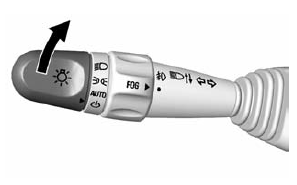
The exterior lamp control is on the turn signal lever on the left side of the steering column.
There are four positions:
 Turns on the headlamps together with
the parking lamps and instrument panel lights.
 Turns on the parking lamps including
all lamps, except the headlamps.
 Turns the exterior lamps on and off
automatically depending on the exterior light.
 Turns all the lamps off, except the
Daytime Running Lamps (DRL).
The DRL automatically turn off when the vehicle is turned off.
See Exterior Lamp Controls on page 6-1 and Daytime Running Lamps (DRL) on page 6-2.
 Interior Lighting
Dome Lamps
The dome lamp controls are in the overhead console.
Move the control to change the lamp setting.
OFF: Turns the lamps off, even when a door is open.
DOOR: Turns the lamps on automat ...
 Windshield Wiper/Washer
The windshield wiper/washer lever is on the right side of the steering column.
Move the lever to one of the following positions: HI: Use for fast wipes.
LO: Use for slow wipes.
INT: Move th ...
Other materials:
Safety Belt Use During Pregnancy
Safety belts work for everyone, including pregnant women. Like all occupants,
they are more likely to be seriously injured if they do not wear safety belts.
A pregnant woman should wear a lap-shoulder belt, and the lap portion should
be worn as low as possible, below the rounding, throughou ...
Instrument Panel Fuse Block
The instrument panel fuse block is on the underside of the driver side instrument
panel.
Open the fuse panel door by pulling out at the top.
Remove the fuse panel door diagonally.
The vehicle may not be equipped with all of the fuses, relays, and features shown.
...
Smartphone Link (Overview)
Before Using Smartphone Link
If equipped, the vehicle can connect to Pandora®, Stitcher SmartRadio®, or other
available applications through the infotainment system.
The applications must be downloaded to the device first, then the device can
be connected to the infotainment system.
Pandora i ...
