
Chevrolet Spark Owners Manual: Turn and Lane-Change Signals
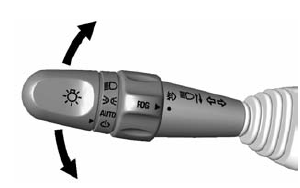
Move the lever all the way up or down to signal a turn.
An arrow on the instrument cluster flashes in the direction of the turn or lane change.
Raise or lower the lever until the arrow starts to flash to signal a lane change. Hold it there until the lane change is completed.
If the lever is moved momentarily to the lane change position, the arrow will flash three times.
The lever returns to its starting position whenever it is released.
If after signaling a turn or a lane change the arrow flashes rapidly or does not come on, a signal bulb may be burned out.
Replace any burned out bulbs. If a bulb is not burned out, check the fuse. See Fuses and Circuit Breakers on page 10-30.
 Hazard Warning Flashers
The hazard warning flasher button is on the center stack.
(Hazard Warning Flasher): Press
to make the front and rear turn signal lamps flash on and off.
This warns others that you are having t ...
 Fog Lamps
If equipped with fog lamps, they are controlled by the
band on the middle of the turn signal
lever.
To use the fog lamps, the ignition must be turned on and the low-beam headlamps
or parkin ...
Other materials:
Different Size Tires and Wheels
If wheels or tires are installed that are a different size than the original
equipment wheels and tires, vehicle performance, including its braking, ride and
handling characteristics, stability, and resistance to rollover may be affected.
If the vehicle has electronic systems such as antilock ...
Using the Preset Buttons
Up to seven favorites pages can be saved, and each page can store up to five
channels.
To change a preset button, tune to the new desired channel and hold the button.
Listening to Preset Channels
Continue pressing or
to select the desired favorites
page.
Press the preset button ...
Rear Window Wiper/ Washer
If equipped with the rear wiper/ washer, the controls are on the end of the windshield
wiper lever.
Turn the rear wiper/washer band to operate the rear window wiper/ washer.
ON: Turns the rear wiper on for continuous wipes.
OFF: Turns the rear wiper off.
(Rear Washer): Sprays washer fluid ...
