
Chevrolet Spark Owners Manual: Air Vents
Adjustable air vents are in the center and on the side of the instrument panel.
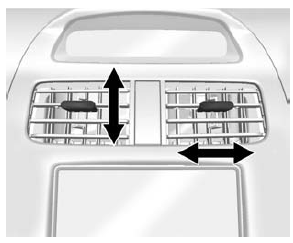
Move the slats to change the direction of the airflow. The center air vent does not close completely.
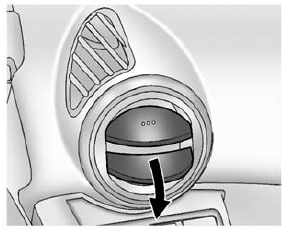
Press the cover of the side air vents to open. Turn open slats clockwise or counterclockwise to direct airflow as needed. Close the cover to stop the airflow.
Additional air vents are located beneath the windshield and the driver and passenger side door windows, and in the footwells.
These are fixed and cannot be adjusted.
Operation Tips
- Clear away any ice, snow, or leaves from air inlets at the base of the windshield that could block the flow of air into the vehicle.
- Keep the path under the front seats clear of objects to help circulate the air inside of the vehicle more effectively.
- Use of non-GM approved hood deflectors can adversely affect the performance
of the system.
Check with your dealer before adding equipment to the outside of the vehicle.
 Climate Control Systems
The heating, cooling, and ventilation for the vehicle can be controlled with
this system.
Fan Control
Air Conditioning
Recirculation
Temperature Control
Rear Window Defogger
Air De ...
 Maintenance
...
Other materials:
Power Windows
Warning
Children could be seriously injured or killed if caught in the
path of a closing window. Never leave keys in a vehicle with children. When there
are children in the rear seat, use the window lockout button to prevent operation
of the windows. See Keys on page 2-1.
The switches on ...
Tire Terminology and Definitions
Air Pressure: The amount of air inside the tire pressing outward on each square
inch of the tire. Air pressure is expressed in kPa (kilopascal) or psi (pounds per
square inch).
Accessory Weight: The combined weight of optional accessories. Some examples
of optional accessories are automatic t ...
Event Data Recorders
This vehicle is equipped with an event data recorder (EDR). The main purpose
of an EDR is to record, in certain crash or near crash-like situations, such as
an air bag deployment or hitting a road obstacle, data that will assist in understanding
how a vehicle’s systems performed. The EDR is de ...
