
Chevrolet Spark Owners Manual: Power Windows
Warning
Children could be seriously injured or killed if caught in the path of a closing window. Never leave keys in a vehicle with children. When there are children in the rear seat, use the window lockout button to prevent operation of the windows. See Keys on page 2-1.
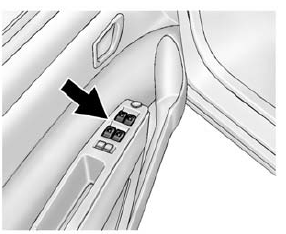
The switches on the driver door control all windows. In addition, each passenger door has a switch for its own window.
Press the switch down to open the window. Pull the front of the switch up to close it.
The power windows only operate with the ignition in ACC/ ACCESSORY or ON/RUN, or when Retained Accessory Power (RAP) is active. See Retained Accessory Power (RAP) on page 9-18.
Window Lockout
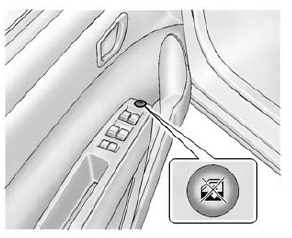
This feature prevents the rear passenger windows from operating, except from the driver position.
- Press
 to activate the
window lockout. - Press
 again to deactivate the
window lockout.
 Windows
Warning
Never leave a child, a helpless adult, or a pet alone in a vehicle,
especially with the windows closed in warm or hot weather.
They can be overcome by the extreme heat and suffer permanent ...
 Sun Visors
Pull the sun visor down to block out glare. Detach the sun visor from the center
mount and swing it to the side.
Visor Vanity Mirror
The vehicle may have vanity mirrors and card holders on the bac ...
Other materials:
If the Off Indicator Is Lit for an Adult-Sized Occupant
If a person of adult size is sitting in the front outboard passenger seat, but
the off indicator is lit, it could be because that person is not sitting properly
in the seat or that the child restraint locking feature is engaged.
Use the following steps to allow the system to detect that per ...
AM-FM Radio
Playing the Radio without Touchscreen
Audio Source Menu
/VOL (Power/Volume): Press to turn
the system on and off. Turn to increase or decrease the volume.
MENU/TUNE: Turn to change the radio station.
RADIO/BAND: Press to select AM and FM.
INFO: Press to display additional information that ma ...
Tire Rotation
Tires should be rotated every 12 000 km (7,500 mi). The first rotation is the
most important.
See Maintenance Schedule on page 11-3.
Tires are rotated to achieve a more uniform wear for all tires.
Anytime unusual wear is noticed, rotate the tires as soon as possible, check
for proper tire inf ...
