
Chevrolet Spark Owners Manual: Storing the Tire Sealant and Compressor Kit
The tire sealant and compressor kit is located in the rear storage area.
- Lift the trim cover.
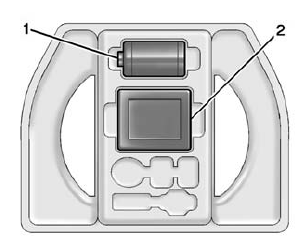
- Remove the tire sealant canister (1) and the compressor (2).
To store the tire sealant and compressor kit, reverse the steps.
 Using the Tire Sealant and Compressor Kit without Sealant to Inflate a Tire
(Not Punctured)
Using the Tire Sealant and Compressor Kit without Sealant to Inflate a Tire
(Not Punctured)
The kit includes:
Sealant Canister Inlet Valve
Sealant/Air Hose
Base of Sealant Canister
Tire Sealant Canister
On/Off Button
Slot on Top of Compressor
Pressure Gauge
Pressur ...
 Jump Starting
For more information about the vehicle battery, see Battery on page 10-22.
If the battery has run down, try to use another vehicle and some jumper cables
to start your vehicle.
Be sure to use the ...
Other materials:
Using the USB Port
The infotainment system can play music or movies by connecting an auxiliary device
to the USB port.
USB Support
If equipped, the USB connector is in the center stack, and uses the USB 2.0 standard.
USB Supported Devices
USB Flash Drives
Portable USB Hard Drives
2G–5G iPod nano®
1G–3G ...
Airbag System
The vehicle has the following airbags:
A frontal airbag for the driver.
A frontal airbag for the front outboard passenger.
A knee airbag for the driver.
A knee airbag for the front outboard passenger
A seat-mounted side impact airbag for the driver.
A seat-mounted side impact airbag fo ...
Infants and Young Children
Everyone in a vehicle needs protection! This includes infants and all other children.
Neither the distance traveled nor the age and size of the traveler changes the need,
for everyone, to use safety restraints. In fact, the law in every state in the United
States and in every Canadian province ...
