
Chevrolet Spark Owners Manual: Shopping Bag Hooks
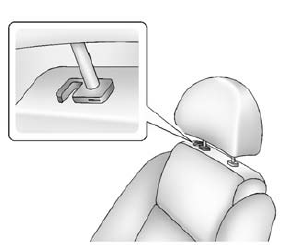
The vehicle has a shopping bag hook under the front seat head restraints. Lift the head restraints to access the hook.
Cargo Net
The cargo net is in the trunk and used to store small loads. The net should not be used to store heavy loads.
 Cargo Cover
Warning
An unsecured cargo cover could strike people in a sudden stop
or turn, or in a crash. Store the cargo cover securely or remove it from the vehicle.
The cargo cover can be used to cover ite ...
 Roof Rack System
Warning
If something is carried on top of the vehicle that is longer or
wider than the roof rack-like paneling, plywood, or a mattress-the wind can catch
it while the vehicle is being driven. The ...
Other materials:
Radio Reception
Frequency interference and static can occur during normal radio reception if
items such as mobile phone chargers, vehicle convenience accessories, and external
electronic devices are plugged into the accessory power outlet. If there is interference
or static, unplug the item from the accessory ...
Remote Keyless Entry (RKE) System
See Radio Frequency Statement on page 13-12.
If there is a decrease in the RKE operating range:
Check the distance. The transmitter may be too far from the vehicle.
Check the location. Other vehicles or objects may be blocking the signal.
Check the transmitter's battery.
See “Battery ...
Cruise Control
If equipped with cruise control:
Press to turn the cruise control
system on and off. A white indicator comes on in the instrument cluster.
RES/+: If there is a set speed in memory, press briefly to resume to that speed
or press and hold to accelerate. If cruise control is already active, u ...
