
Chevrolet Spark Owners Manual: Power Mirrors
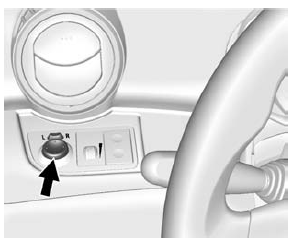
- If equipped, move the selector switch to L (Left) or R (Right) to choose the driver or passenger mirror.
- Move the control up, down, or side to side to adjust the mirror. Adjust the mirrors so the side and the area behind the vehicle can be seen.
- Return the selector switch to the center when done.
 Manual Mirrors
If equipped, move the control up, down, or side to side to adjust the mirror.
Adjust the mirrors so the side and the area behind the vehicle can be seen. ...
 Folding Mirrors
Manual Folding Mirrors
The vehicle has manual folding mirrors. These mirrors can be folded inward to
prevent damage when going through an automatic car wash. To fold, pull the mirror
toward the v ...
Other materials:
Recreational Vehicle Towing
Recreational vehicle towing refers to towing the vehicle behind another vehicle,
such as behind a motor home. The two most common types of recreational vehicle towing
are known as dinghy towing and dolly towing. Dinghy towing is towing the vehicle
with all four wheels on the ground. Dolly towi ...
Doing Your Own Service Work
Warning
It can be dangerous to work on your vehicle if you do not have
the proper knowledge, service manual, tools, or parts. Always follow owner manual
procedures and consult the service manual for your vehicle before doing any service
work.
If doing some of your own service work, use the p ...
Adding Equipment to the Airbag-Equipped Vehicle
Adding accessories that change the vehicle's frame, bumper system, height, front
end, or side sheet metal may keep the airbag system from working properly. The operation
of the airbag system can also be affected by changing any parts of the front seats,
safety belts, the airbag sensing and ...
