
Chevrolet Spark Owners Manual: Windows
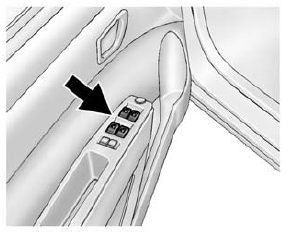
Press the switch down to open the window. Pull the front of the switch up to close it.
The switches work when the vehicle is in ON/RUN, ACC/ACCESSORY, or when Retained Accessory Power (RAP) is active.
See Retained Accessory Power (RAP) on page 9-18 and Power Windows on page 2-14.
 Liftgate
To lock or unlock the liftgate from the outside, use the key in the liftgate
lock.
If equipped, press on the RKE transmitter
to unlock all doors and press to lock.
See Remote Keyless Entry (R ...
 Seat Adjustment
Manual Seats
To adjust the seat:
Lift the bar under the front edge of the seat cushion to unlock the seat.
Slide the seat to the desired position and release the bar.
Try to move the seat ...
Other materials:
Bluetooth (Infotainment Controls)
To use infotainment controls to access the menu system, see Overview on page
7-3.
Pairing
A Bluetooth-enabled cell phone must be paired to the Bluetooth system and then
connected to the vehicle before it can be used. See your cell phone manufacturer's
user guide for Bluetooth functions b ...
Climate Control Systems
The heating, cooling, and ventilation for the vehicle can be controlled with
this system.
Fan Control
Air Conditioning
Recirculation
Temperature Control
Rear Window Defogger
Air Delivery Mode Control
(Fan Control): Turn clockwise or
counterclockwise to increase or decrease ...
Wheel Alignment and Tire Balance
The tires and wheels were aligned and balanced at the factory to provide the
longest tire life and best overall performance. Adjustments to wheel alignment and
tire balancing are not necessary on a regular basis. Consider an alignment check
if there is unusual tire wear or the vehicle is signi ...
