
Chevrolet Spark Owners Manual: Vehicle Data
Capacities and Specifications
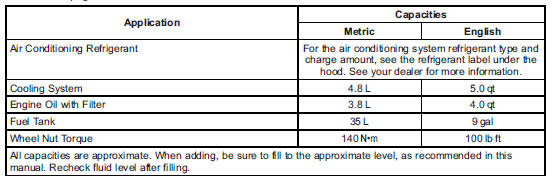
The following approximate capacities are given in metric and English conversions. See Recommended Fluids and Lubricants on page 11-12 for more information.

Engine Drive Belt Routing
 Service Parts Identification Label
This label, on the inside of the glove box, has the following information:
Vehicle Identification Number (VIN).
Model designation.
Paint information.
Production options and special equipment ...

Other materials:
Seat Adjustment
Manual Seats
To adjust the seat:
Lift the bar under the front edge of the seat cushion to unlock the seat.
Slide the seat to the desired position and release the bar.
Try to move the seat back and forth to be sure it is locked in place.
See Seat Adjustment on page 3-5.
Seat Height A ...
Engine Compartment Fuse Block
The engine compartment fuse block is on the driver side of the vehicle, near
the battery.
Caution
Spilling liquid on any electrical component on the vehicle may
damage it. Always keep the covers on any electrical component.
To access the fuses, press the tab at the front of the cover, and ...
Tire Pressure Monitor Operation
This vehicle may have a Tire Pressure Monitor System (TPMS).
The TPMS is designed to warn the driver when a low tire pressure condition exists.
TPMS sensors are mounted onto each tire and wheel assembly, excluding the spare
tire and wheel assembly. The TPMS sensors monitor the air pressure in t ...
