
Chevrolet Spark Owners Manual: Tire Rotation
Tires should be rotated every 12 000 km (7,500 mi). The first rotation is the most important.
See Maintenance Schedule on page 11-3.
Tires are rotated to achieve a more uniform wear for all tires.
Anytime unusual wear is noticed, rotate the tires as soon as possible, check for proper tire inflation pressure, and check for damaged tires or wheels. If the unusual wear continues after the rotation, check the wheel alignment. See When It Is Time for New Tires on page 10-49 and Wheel Replacement on page 10-54.
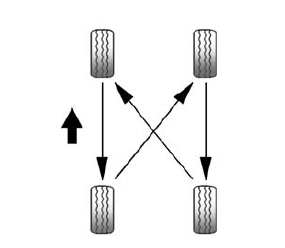
Use this rotation pattern when rotating the tires.
Adjust the front and rear tires to the recommended inflation pressure on the Tire and Loading Information label after the tires have been rotated. See Tire Pressure on page 10-43 and Vehicle Load Limits on page 9-9.
Reset the Tire Pressure Monitor System. See Tire Pressure Monitor Operation on page 10-45.
Check that all wheel nuts are properly tightened. See “Wheel Nut Torque” under Capacities and Specifications on page 12-2.
Warning
Rust or dirt on a wheel, or on the parts to which it is fastened, can make wheel nuts become loose after a time. The wheel could come off and cause a crash. When changing a wheel, remove any rust or dirt from places where the wheel attaches to the vehicle. In an emergency, a cloth or a paper towel can be used, however, use a scraper or wire brush to remove all rust or dirt.
Lightly coat the center of the wheel hub with wheel bearing grease after a wheel change or tire rotation to prevent corrosion or rust build-up. Do not get grease on the flat wheel mounting surface or on the wheel nuts or bolts.
 Tire Inspection
We recommend that the tires, including the spare tire, if the vehicle has one,
be inspected for signs of wear or damage at least once a month.
Replace the tire if:
The indicators at three or mo ...
 When It Is Time for New Tires
Factors such as maintenance, temperatures, driving speeds, vehicle loading, and
road conditions affect the wear rate of the tires.
Treadwear indicators are one way to tell when it is time for n ...
Other materials:
Antilock Brake System (ABS) Warning Light
This light comes on briefly when
the engine is started.
If the light stays on, turn the ignition to LOCK/OFF or if the light comes on,
stop as soon as possible and turn the ignition off. Then start the engine again
to reset the system.
If the light still stays on, or comes on again while dr ...
Pictures and Movies (Audio System)
The infotainment system can play the music files contained in the USB storage
device or iPod/iPhone products.
Audio System Information
Using MP3/WMA/OGG/WAV Files
Music files with .mp3, .wma, .ogg, and .wav file name extensions can be
played.
MP3 files that can be played are: Bit rate: ...
Pictures and Movies (Picture System)
The infotainment system can view picture files stored on a USB storage device
and devices that support Media Transfer Protocol (MTP).
Picture System Information
Caution for Using Picture Files
File size:
JPG: Within 64 to 5,000 pixels (Width) and 64 to 5,000 pixels (Height).
BMP, PNG, GIF ...
