
Chevrolet Spark Owners Manual: Shopping Bag Hooks
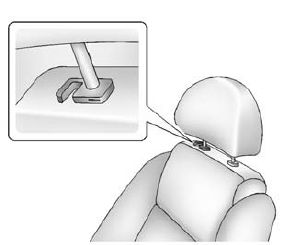
The vehicle has a shopping bag hook under the front seat head restraints. Lift the head restraints to access the hook.
Cargo Net
The cargo net is in the trunk and used to store small loads. The net should not be used to store heavy loads.
 Cargo Cover
Warning
An unsecured cargo cover could strike people in a sudden stop
or turn, or in a crash. Store the cargo cover securely or remove it from the vehicle.
The cargo cover can be used to cover ite ...
 Roof Rack System
Warning
If something is carried on top of the vehicle that is longer or
wider than the roof rack-like paneling, plywood, or a mattress-the wind can catch
it while the vehicle is being driven. The ...
Other materials:
Pictures and Movies (Movie System)
The infotainment system can play movie files stored on a USB storage device and
devices that support Media Transfer Protocol (MTP).
Movie System Information
Caution for Using Movie Files
Available resolution: Within 720 x 576 (W x H) pixels.
Frame rate: Less than 30 fps.
Playable movie f ...
Engine Overheating
The vehicle has an indicator to warn of the engine overheating. See Engine Coolant
Temperature Warning Light on page 5-18.
If the decision is made not to lift the hood when this warning appears, get service
help right away. See Roadside Assistance Program on page 13-5.
If the decision is made ...
Off-Road Recovery
The vehicle's right wheels can drop off the edge of a road onto the shoulder
while driving. Follow these tips:
Ease off the accelerator and then, if there is nothing in the way, steer
the vehicle so that it straddles the edge of the pavement.
Turn the steering wheel about one-eigh ...
