
Chevrolet Spark Owners Manual: Power Windows
Warning
Children could be seriously injured or killed if caught in the path of a closing window. Never leave keys in a vehicle with children. When there are children in the rear seat, use the window lockout button to prevent operation of the windows. See Keys on page 2-1.
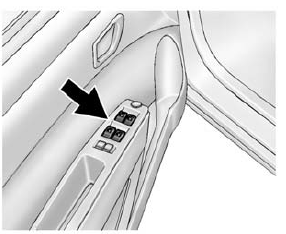
The switches on the driver door control all windows. In addition, each passenger door has a switch for its own window.
Press the switch down to open the window. Pull the front of the switch up to close it.
The power windows only operate with the ignition in ACC/ ACCESSORY or ON/RUN, or when Retained Accessory Power (RAP) is active. See Retained Accessory Power (RAP) on page 9-18.
Window Lockout
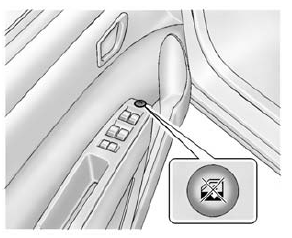
This feature prevents the rear passenger windows from operating, except from the driver position.
- Press
 to activate the
window lockout. - Press
 again to deactivate the
window lockout.
 Windows
Warning
Never leave a child, a helpless adult, or a pet alone in a vehicle,
especially with the windows closed in warm or hot weather.
They can be overcome by the extreme heat and suffer permanent ...
 Sun Visors
Pull the sun visor down to block out glare. Detach the sun visor from the center
mount and swing it to the side.
Visor Vanity Mirror
The vehicle may have vanity mirrors and card holders on the bac ...
Other materials:
Seat Adjustment
Manual Seats
Warning
You can lose control of the vehicle if you try to adjust a driver
seat while the vehicle is moving.
Adjust the driver seat only when the vehicle is not moving.
To adjust the seat:
Lift the bar under the front edge of the seat cushion to unlock the seat.
Slide the ...
Air Vents
Adjustable air vents are in the center and on the side of the instrument panel.
Move the slats to change the direction of the airflow. The center air vent does
not close completely.
Press the cover of the side air vents to open. Turn open slats clockwise or counterclockwise
to direct a ...
OnStar Overview
Voice Command Button
Blue OnStar Button
Emergency Button
This vehicle may be equipped with a comprehensive, in-vehicle system that can
connect to a live OnStar Advisor for Emergency, Security, Navigation, Connection,
and Diagnostic Services. OnStar services may require a paid subscripti ...
