
Chevrolet Spark Owners Manual: Manual Mirrors
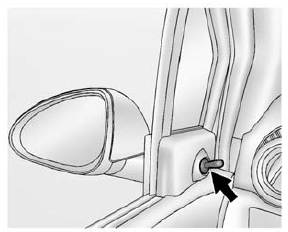
If equipped, move the control up, down, or side to side to adjust the mirror.
Adjust the mirrors so the side and the area behind the vehicle can be seen.
 Convex Mirrors
Warning
A convex mirror can make things, like other vehicles, look farther
away than they really are. If you cut too sharply into the right lane, you could
hit a vehicle on the right. Check the i ...
 Power Mirrors
If equipped, move the selector switch to L (Left) or R (Right) to choose
the driver or passenger mirror.
Move the control up, down, or side to side to adjust the mirror. Adjust
the mirr ...
Other materials:
Windshield Wiper/Washer
The windshield wiper/washer lever is on the right side of the steering column.
Move the lever to one of the following positions: HI: Use for fast wipes.
LO: Use for slow wipes.
INT (Intermittent Wipes): Move the lever up to INT for intermittent wipes, then
turn the INT band up for more ...
High-Beam On Light
This light comes on when the high-beam
headlamps are in use.
See Headlamp High/Low-Beam Changer on page 6-1 for more information.
Daytime Running Lamps (DRL) Indicator Light
This light, in the display on the
top of the center stack, turns on whenever the Daytime Running Lamps are in use.
Se ...
Safety Belt Extender
If the vehicle's safety belt will fasten around you, you should use it.
But if a safety belt is not long enough, your dealer will order you an extender.
When you go in to order it, take the heaviest coat you will wear, so the extender
will be long enough for you. To help avoid personal inju ...
