
Chevrolet Spark Owners Manual: Hood
To open the hood:
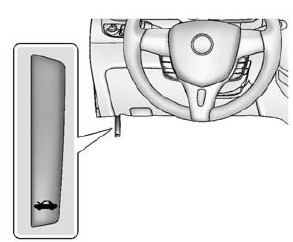
- Pull the hood release handle inside the vehicle. It is on the lower left side of the instrument panel.
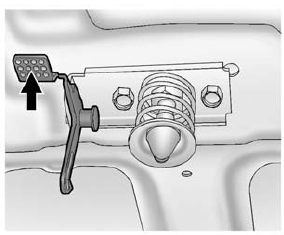
- Go to the front of the vehicle and push the secondary hood release lever up.
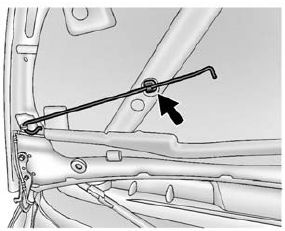
- Lift the hood and release the hood prop from the prop retainer, which is under the hood.
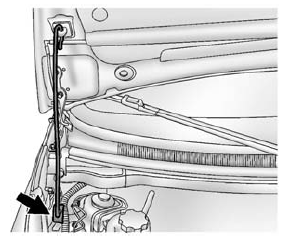
- Securely place the hood prop into the hood prop holder, at the rear passenger side of the engine compartment.
To close the hood:
- Before closing the hood, be sure all filler caps are on properly.
Then, lift the hood to relieve pressure on the hood prop.
Remove the hood prop from the prop holder in the rear passenger side of the engine compartment and secure it to the retainer on the underside of the hood. The prop rod must click into place when returning it to the retainer to prevent hood damage.
- Lower the hood 30 cm (12 in) above the vehicle and release it so it fully latches. Check to make sure the hood is closed and repeat the process if necessary.
 Doing Your Own Service Work
Warning
It can be dangerous to work on your vehicle if you do not have
the proper knowledge, service manual, tools, or parts. Always follow owner manual
procedures and consult the service manual ...
 Engine Compartment Overview
Windshield Washer Fluid Reservoir. See Washer Fluid on page 10-19.
Engine Coolant Surge Tank and Pressure Cap. See Cooling System on page 10-13.
Engine Oil Dipstick. See Engine Oil on page ...
Other materials:
Electrical System Overload
The vehicle has fuses and circuit breakers to protect against an electrical system
overload.
When the current electrical load is too heavy, the circuit breaker opens and
closes, protecting the circuit until the current load returns to normal or the problem
is fixed. This greatly reduces the c ...
OnStar Overview
Voice Command Button
Blue OnStar Button
Emergency Button
This vehicle may be equipped with a comprehensive, in-vehicle system that can
connect to a live OnStar Advisor for Emergency, Security, Navigation, Connection,
and Diagnostic Services. OnStar services may require a paid subscripti ...
Door Locks
To lock or unlock the doors from outside the vehicle:
Use the key in the driver door to lock and unlock the door.
Press or
on the Remote Keyless Entry (RKE)
transmitter, if equipped, to lock and unlock the doors. See Remote Keyless Entry
(RKE) System Operation on page 2-3.
...
