
Chevrolet Spark Owners Manual: Door Locks
Warning
Unlocked doors can be dangerous.
- Passengers, especially children, can easily open the doors and fall out of a moving vehicle. When a door is locked, the handle will not open it. The chance of being thrown out of the vehicle in a crash is increased if the doors are not locked. So, all passengers should wear safety belts properly and the doors should be locked whenever the vehicle is driven.
- Young children who get into unlocked vehicles may be unable to get out. A child can be overcome by extreme heat and can suffer permanent injuries or even death from heat stroke. Always lock the vehicle whenever leaving it.
- Outsiders can easily enter through an unlocked door when you slow down or stop the vehicle. Locking the doors can help prevent this from happening.
To lock or unlock the doors from outside the vehicle:
- Use the key in the driver door to lock and unlock the door.
- Press
 or
or
 on the Remote Keyless Entry (RKE)
transmitter, if equipped, to lock and unlock the doors. See Remote Keyless Entry (RKE) System Operation on page 2-3.
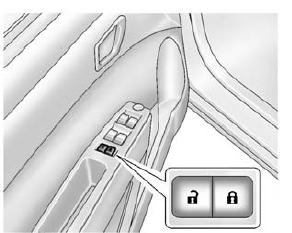
To lock or unlock the doors from inside the vehicle:
- Press or
, if equipped. - Use the lock knob on the top of the door panel.
 Remote Keyless Entry (RKE) System Operation
The RKE transmitter may work up to 60m (195 ft) away from the vehicle.
Other conditions can affect the performance of the transmitter. See Remote Keyless
Entry (RKE) System on page 2-2.
The fo ...
 Central Locking System
This system allows the doors and liftgate to be locked and unlocked by using
the Remote Keyless Entry (RKE) transmitter or by using the key in the driver door.
See Door Locks on page 2-5 and Liftga ...
Other materials:
Taillamps, Turn Signal, Stoplamps, and Back-Up Lamps
Stoplamp/Taillamp
Turn Signal Lamp/Taillamp
Back-up Lamp
To replace a taillamp, turn signal lamp, stoplamp, or back-up bulb:
Open the liftgate. See Liftgate on page 2-8.
Remove the two screws and the lamp assembly.
Turn the bulb socket counterclockwise and remove the so ...
Cooling System
The cooling system allows the engine to maintain the correct working temperature.
Engine Coolant Surge Tank and Pressure Cap
Engine Cooling Fan (Out of View)
Warning
An electric engine cooling fan under the hood can start up
even when the engine is not running and can cause injur ...
Battery
The original equipment battery is maintenance free. Do not remove the cap and
do not add fluid.
Refer to the replacement number shown on the original battery label when a new
battery is needed. See Engine Compartment Overview on page 10-7 for battery location.
Warning
WARNING: Battery posts, ...
